


자손선택자(>)와 후손선택자( )
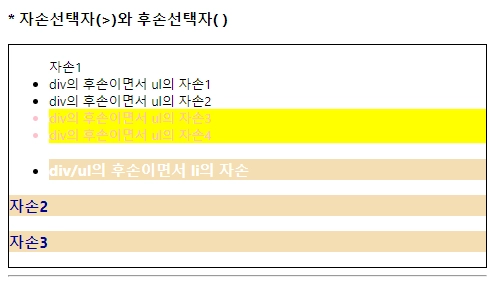
<h3>* 자손선택자(>)와 후손선택자( )</h3>
<div style="border: 1px solid black;">
<ul>자손1
<li>div의 후손이면서 ul의 자손1</li>
<li>div의 후손이면서 ul의 자손2</li>
<li class="ch">div의 후손이면서 ul의 자손3</li>
<li class="ch">div의 후손이면서 ul의 자손4</li>
<li>
<h3>div/ul의 후손이면서 li의 자손</h3>
</li>
</ul>
<h3>자손2</h3>
<h3 class="ch">자손3</h3>
</div>
HTML
복사
<script>
$(function(){
$("div>h3").css("color", "darkblue");
$("div h3").css("backgroundColor", "wheat");
//$("li>h3")
//$("ul h3")
$("ul>li>h3").css("color", "white");
$("ul>.ch").css("backgroundColor", "yellow");
$("li.ch").css("color", "pink");
})
</script>
JavaScript
복사
속성선택자
•
선택자[속성] : 특정 속성을 가지고 있는 모든 요소 선택
•
선택자[속성=속성값] : 속성값이 특정값과 "일치"하는 모든 요소 선택
•
선택자[속성~=특정값] : 속성값에 특정값을 "단어로써 포함"하는 요소 선택
•
선택자[속성^=특정값] : 속성값이 특정값으로 "시작"하는 요소 선택
•
선택자[속성$=특정값] : 속성값이 특정값으로 "끝"나는 요소 선택
•
선택자[속성*=특정값] : 속성값에 특정값을 "포함"하는 요소 선택
<script>
$(function(){
$("input[class]").css("backgroundColor", "red");
$("input[type=text]").val("change value");
$("input[class~=test]").val("1234");
// .val() : value 속성과 관련된 기능 수행
$("input[type^=ra]").attr("checked", true);
$("input[type$=box]").attr("checked", true);
// .attr() : 그 외의 속성들과 관련된 기능 수행
//$("input[class*=st2]").css("width", "100px");
//$("input[class*=st2]").css("height", "100px");
//$("input[class*=st2]").val("버튼");
// => 한줄로 이어서 작성 가능
$("input[class*=st2]").css("width", "100px").css("height", "100px").val("버튼");
})
</script>
JavaScript
복사
입력양식 선택자 (input태그의 type속성에 따라서도 요소선택)
•
$(:선택하고자하는입력양식).변경속성("", "");
•
$(:선택하고자하는입력양식).변경속성({"" : "", "" : ""});
<script>
$(function(){
$(":text").css("backgroundColor", "red");
//$(":button").css("width", "100px").css("height", "100px").val("왕버튼");
$(":button").css({width:"100px", height:"100px"}).val("왕버튼");
$(":checkbox").attr("checked", true);
// 첨부파일 : 배경색을 연두색으로
$(":file").css("backgroundColor", "yellowgreen");
// 비밀번호 : 배경색을 노란색으로
$(":password").css("backgroundColor", "yellow");
// 라디오버튼 : checked속성추가, 가로길이50px, 세로길이50px
$(":radio").attr("checked", true).css({width:"30px", height:"30px"});
// 초기화버튼 : 배경색을 파란색, 글자색을 흰색, 테두리 없애기
$(":reset").css({
backgroundColor:"blue",
color:"white",
border:"none"
});
// 제출버튼 : 클릭시 alert("ㅋㅋ") 실행되도록
$(":submit").click(function(){
//alert("ㅋㅋㅋㅋ");
alert($(":password").val());
//alert($(":text").eq(1).val());
});
// mouseenter : 선택된 요소의 경계 내부로 마우스가 들어가는 순간 발생하는 이벤트
$(":submit").mouseenter(function(){
$(this).css("backgroundColr", "purple");
});
// mouseout : 선택된 요소의 경계 외부로 마우스가 나갔을 때 발생하는 이벤트
$(":submit").mouseout(function(){
$(this).css("backgroundColor", "");
});
// hover : mouseenter + mouseout
$(":submit").hover(function(){
$(this).addClass("purpleStyle");
}, function(){
$(this).removeClass("purpleStyle");
});
// .addClass() : 선택된 요소에 클래스를 추가해주는 메소드
// .removeClass() : 선택된 요소에 클래스를 제거해주는 메소드
})
</script>
JavaScript
복사
상태(checked, selected, disabled, enabled) 선택자
checked 상태 선택자 (radio, checkbox)
<script>
$(function(){
/*
// 버튼 클릭시 현재 checked 상태인 요소 선택해서 스타일 부여
$("#btn").click(function(){
$("input:checked").css({width:"50px", height:"50px"});
})
*/
// checkbox인 요소들에 change이벤트 발생시 실행할 function
$(":checkbox").change(function(){
// prop => 상태값
// checked 발생시 true/false 반환
if($(this).prop("checked")){
$(this).css({width:"50px", height:"50px"});
}else{
$(this).css({width:"", height:""});
}
})
})
</script>
JavaScript
복사
selected 상태 선택자 (select>option)
<select name="national">
<option value="x">선택안함</option>
<option value="ko">한국</option>
<option value="us">미국</option>
<option value="eu">영국</option>
</select>
<button onclick="test1();">확인</button>
<br>
선택한 나라 : <label id="result">선택안함</label>
JavaScript
복사
<script>
function test1(){
// 현재 선택(selected)되어있는 목록값 가져옴
//console.log($("option:selected").val());
//console.log($("option:selected").html());
//$("#result").html($("option:selected").val()
$("#result").html($("option:selected").html());
// document.getElementById("result").innerHTML = 현재선택된 option의 innerHTML
}
</script>
JavaScript
복사
disabled, enalbed 상태 선택자 (input요소들, button들 등등)
<script>
$(function(){
$("#wrap>:enabled").css("backgroundColor", "yellowgreen");
$("#wrap>:disabled").css("backgroundColor", "orangered");
})
</script>
JavaScript
복사